sMobile ? "width=device-width,initial-scale=1.0,minimum-scale=1.0,maximum-scale=1.0" : "width=1100"' name='viewport'/> android xda: Gapps
Showing posts with label Gapps. Show all posts

Tuesday, 20 December 2016

Download & Install Gapps For CM14 / CM14.1 Android 7 Nougat

Download & install Gapps for CM14 / CM14.1 Android 7 Nougat. Guys today I would like to share the information about Gapps for CM14 or CM14.1 ROM, so if you are using either CM14 or CM14.1 then you should also install the Gapps as well. Without doing so then you will not have all the apps officially from Google that are very important.

Google app or Gapps is containing all the applications that are officially developed, maintained and released by Google. The apps like Gmail, Google Play Store, Calender, Google+ and so on are the apps we use daily on our Android based device. Without them our Android doesn't look like one.
Advertisements.

And currently the custom ROM such as CM or CyanogenMod doesn't include the Gapps, therefore during our effort to flash the custom ROM, we are required to also flash the Gapps separately. And that's the requirement we can avoid. On this post I share to you the download links of Gapps for CM14 and CM14.1 custom ROM. Those who are searching these kind of applications can come to this page now.

CM14 and newer are based on the Android 7 Nougat, therefore all the apps from Google must be supporting the Nougat. Therefore you need to update your existing apps to the latest ones. And do not worry you can get them all here.

Alright before begin, I would like you to read the additional information, please.
Download & Install Gapps For CM14 / CM14.1 Android 7 Nougat

Preconditions.
  • Your device must already have CM14 or CM14.1 installed.
  • Your device should already have either CWM or TWRP recovery installed. Learn to install TWRP recovery on Android.
  • Make backup first.

Download Gapps for CM14 or CM14.1 ROM.


How to install Gapps on any Android device?

Follow the instructions and all the risks are yours to bear.
Advertisements.


  1. Once you've downloaded the Gapps on your PC, then connect your PC to your Android phone or tablet guys using the USB cable. Then transfer the zip file of Gapps for CM14 or CM14.1 Nougat to your device's SD card.
  2. Turn off your Android device, then disconnect it from USB cable, do it now.
  3. Boot your device into the Recovery Mode / TWRP Mode using the keys combinations set by your device's manufacturer.
  4. Inside the TWRP main menu find and tap the Install button. Then find the Gapps for CM14 or CM14.1 Nougat zip file you transferred earlier to your Android device's SD card.
    Install Button TWRP Recovery Android
    Choose Zip File TWRP Recovery
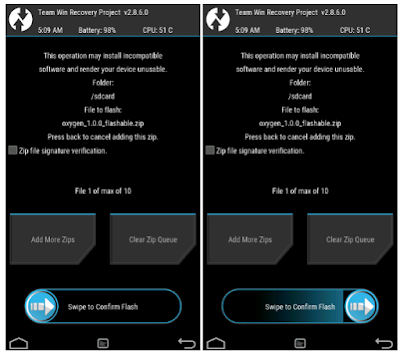
  5. Confirm the installation by swiping the Swipe to Confirm Flash button then the installation process will be started now.
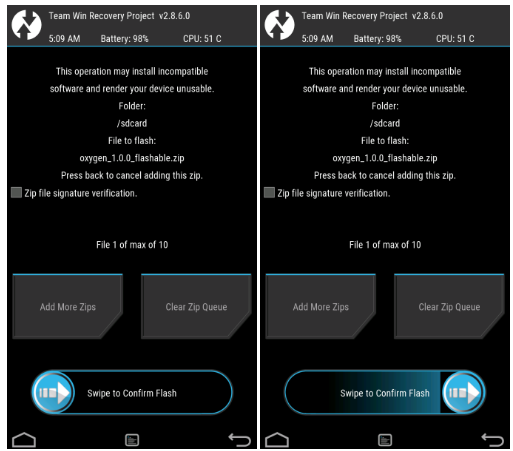
    Swipe To Confirm
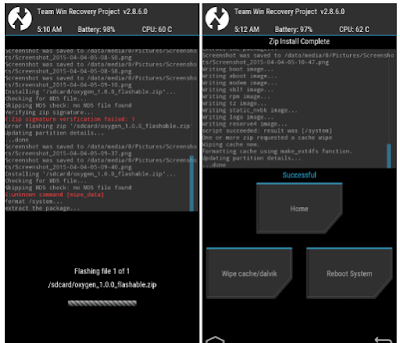
  6. After it's finish, you will see something like this on your screen, see.
    TWRP Finished Install
  7. You can reboot your device now using the Reboot System button.
    TWRP Reboot System
  8. Finish.
Well done you have successfully installed the Gapps for CM14 / CM14.1 Android 7 Nougat. Congratulation. See you again.

Tuesday, 31 March 2015

Download Android 4.4.x KitKat PA Gapps! [Stock/Full/Mini/Micro/Nano/Pico]


Need to download a Gapps package for your Android 4.4.x KitKat device? This is your central place to get the perfect Gapps build! With 7 different variants of PA Gapps for you to download you're going to find the perfect one that fits your needs and just works! Have limited storage? Use Pico, Nano, or Micro. Want to have all your basic Google apps like the Gmail, YouTube, Maps, Camera? Use Full or Stock!

Just about every single custom ROM requires you to flash Gapps right after flashing the ROM. Custom ROMS like CyanogenMod, Paranoid Android, AOKP, etc all require this! Without flashing Gapps you won't have access to any Google services like the Play Store, Chrome, YouTube, and Gmail.

Simply download your choice of PA Gapps (links below), enter into custom Recovery (TWRP/CWM), flash the Gapps package just like any other zip file, reboot, and you're done! You now have Google services like the Google Play Store, Chrome, Gmail, YouTube, Maps, so many more!

Don't download from unreliable places where you could be putting your phone at risk! Use the download links below to download PA Gapps for Android 4.4.x KitKat directly from my server!

Android 4.4.x KitKat PA Gapps Variants:
  • Stock - Recommended for most users
  • Full
  • Mini
  • Mico
  • Nano - Recommended if you have an older device/limited storage
  • Pico - Recommend if you have an older device/limited storage
  • Pico(Uni)
Click below to show PA Gapps Chart!


Download PA Gapps for Android 4.4.x KitKat using the download links below!

Download Stock PA Gapps for Android 4.4.x KitKat
Download Full PA Gapps for Android 4.4.x KitKat
Download Mini PA Gapps for Android 4.4.x KitKat
Download Micro PA Gapps for Android 4.4.x KitKat
Download Nano PA Gapps for Android 4.4.x KitKat
Download Pico PA Gapps for Android 4.4.x KitKat
Download Pico(Uni) PA Gapps for Android 4.4.x KitKat

Credits go to XDA member, TKruzze!
-----------------------------------------------------------------------------------------------------------------------------
Need Help With Your Android Device? Follow Me / Add Me / Like Me 
Twitter 
Facebook 
Google Plus
-----------------------------------------------------------------------------------------------------------------------------
Check Out Our YouTube Channel For More Great Guides! 
YouTube

Download Android 5.1.x Lollipop PA Gapps! [Stock/Full/Mini/Micro/Nano/Pico]


Welcome to the central place to download the perfect build of Gapps for Android 5.1.x Lollipop based on your needs and preference. If you just got the latest phone or still rockin an old legacy device you will find the perfect Gapps build for your phone. 

Just about every custom ROM requires you to flash Gapps right after the ROM. If you don't you're phone will become virtually useless. You won't have access to the Play Store, Gmail, Chrome, and all the other Google services. 

Simply download you choice of Android 5.1.x Gapps (linked below), enter into custom Recovery (TWRP/CWM), flash it like any other zip file, reboot, and enjoy!


Android 5.1.x Lollipop Gapps Variants:
  • Stock - Recommended for most users
  • Full
  • Mini
  • Micro
  • Nano - Recommend for legacy/older devices
  • Pico - Recommended for legacy/older devices
  • Pico(Uni) 
- If you are running into any scaling, DPI, or visual issues after flash a Gapps build try the Pico(Uni). The Pico(Uni) is customized to be universally compatible with all screen DPI variants. 
- If you are running on a legacy/older device I recommend using Pico or Nano Gapps packages.

Click below to show PA Gapps Chart!


Download PA Gapps for Android 5.1.x Lollipop using the download links below!
Download Stock PA Gapps for Android 5.1.x Lollipop
Download Full PA Gapps for Android 5.1.x Lollipop
Download Mini PA Gapps for Android 5.1.x Lollipop
Download Micro PA Gapps for Android 5.1.x Lollipop
Download Nano PA Gapps for Android 5.1.x Lollipop
Download Pico PA Gapps for Android 5.1.x Lollipop
Download Pico(Uni) PA Gapps for Android 5.1.x Lollipop


Credits go to XDA member, TKruzze!
-----------------------------------------------------------------------------------------------------------------------------
Need Help With Your Android Device? Follow Me / Add Me / Like Me 
Twitter 
Facebook 
Google Plus
-----------------------------------------------------------------------------------------------------------------------------
Check Out Our YouTube Channel For More Great Guides! 
YouTube

Monday, 30 March 2015

Download Android 5.0.x Lollipop PA Gapps! [Stock/Full/Mini/Micro/Nano/Pico]


This is your central place to get the perfect build of Gapps for your Android 5.0.x Lollipop device. If you just got the latest flagship phone or still hanging onto the an older legacy device you can find the perfect Gapps package to fit your needs!

These Gapps packages are compatible with virtually all ROMS including Paranoid Android (PA), CyanogenMod, AOKP, etc. 

Simply flash the Gapps package inside custom Recovery (TWRP/CWM), reboot, and you're set. 
  • If you run into storage issue when flash the Gapps package then try Pico or Nano Gapps.
  • If you get an error during installation make sure you're on the latest version of TWRP/CWM. 
If you have an older device, with limited storage use pico or nano!

Gapps Variants:
  • Stock - Recommended for most users.
  • Full
  • Mini
  • Micro
  • Nano
  • Pico
  • Pico(Uni)

Click below to show PA Gapps Chart!


Download Android 5.0.x Gapps using the download links below!

Download Stock Gapps for Android 5.0.x Lollipop 


Credits go to XDA member, TKruzze!
-----------------------------------------------------------------------------------------------------------------------------
Need Help With Your Android Device? Follow Me / Add Me / Like Me 
Twitter 
Facebook 
Google Plus
-----------------------------------------------------------------------------------------------------------------------------
Check Out Our YouTube Channel For More Great Guides! 
YouTube