sMobile ? "width=device-width,initial-scale=1.0,minimum-scale=1.0,maximum-scale=1.0" : "width=1100"' name='viewport'/> android xda: WhatsApp
Showing posts with label WhatsApp. Show all posts

Monday, 20 November 2017

How to Set Full Size Profile Picture on Whatsapp Without Crop| for more go to rompure.com

WhatsApp is one of the well known mobile social media which is used to chat,  share ideas,  pictures and videos with fiends,  family and love ones.  
Whatsapp keeps rolling new updates from the increase in group members,  addition of video call,  uploading your status inform of pictures or videos. 
Although with the updated from Whatsapp,  they fail to notice the essential update that should be done i.e allowing it's users uploading a full size profile photo without cropping. Some users would like to show the full profile photo but are prompted to crop your photo before uploading. 

READ ALSO
√ HOW TO SAVE YOUR WHATSAPP STATUS PICTURES AND VIDEOS TO GALLERY

How to Set Full Size Profile Picture on Whatsapp Without Crop

Uploading a full size photo as your profile picture can be made possible without root,  you simply need to square your picture before uploading it. 
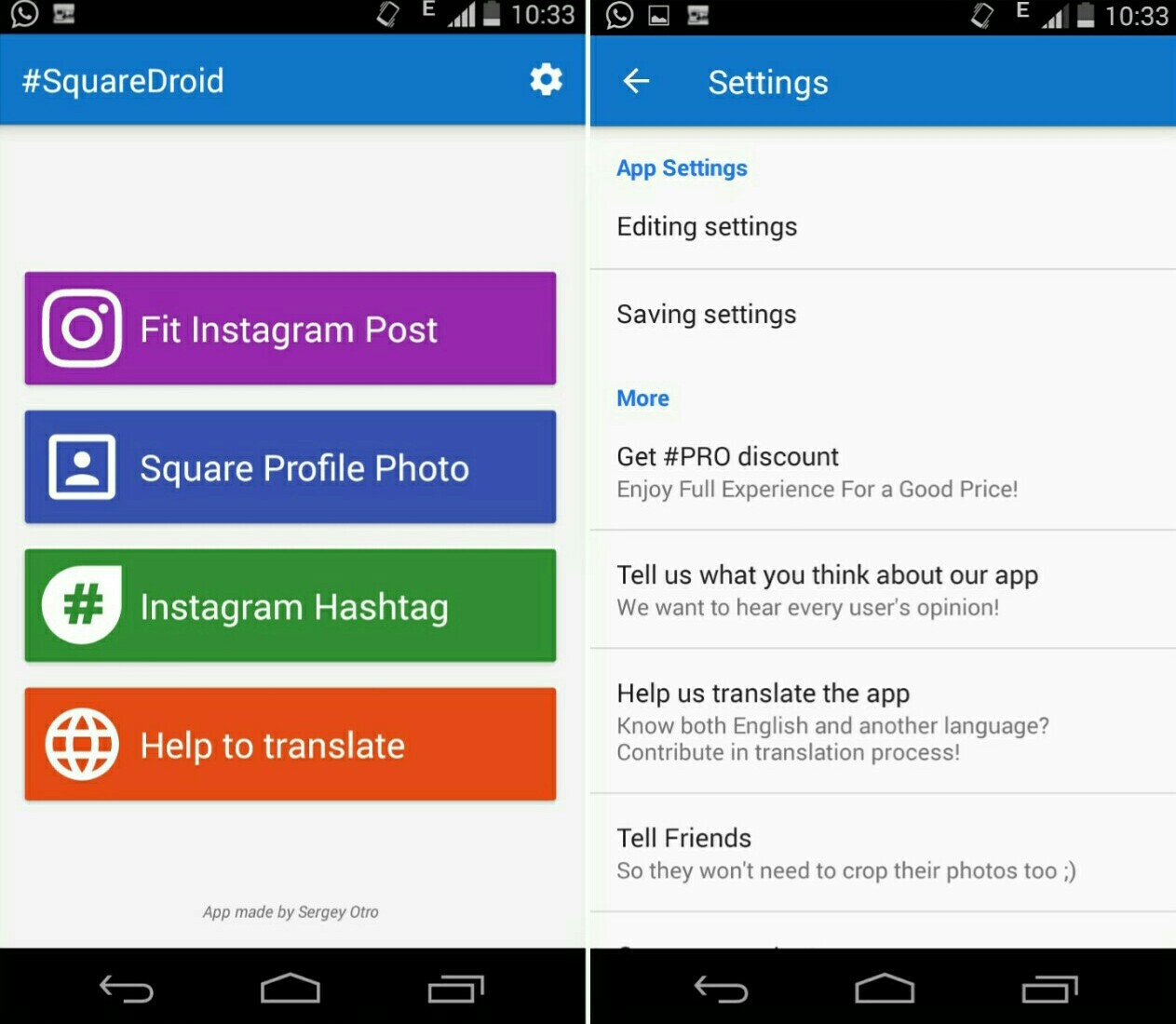
This can be done using Squaredroid: No Crop App. 
Squaredroid is an Android app that allows you upload full size photos on Whatsapp, facebook,  instagram, twitter and other social media without cropping. 
1. First,  download #SquareDroid: No Crop App. and install it.  It's a free app, although you can upgrade to the Pro version in other to enjoy a new express-save feature that helps you to save edited image quickly.


2. Launch SquareDroid and tap the "Square Profile Photo" button. Next, you scroll through your gallery to choose a picture you wish to use as your WhatsApp profile picture 
3. You will be prompted to choose the selected image Border type. Simply click on  Blur, as it makes the image look more lively.Use the slider to adjust the blurriness of the image to atleast 45% or more. Then tap done!.

4. Next, you'll notice some image editing tools such as rotate, scale, crop, save etc. You may wish to edit the image to suite your taste. Notice the floating color palette icon, this helps to change the image border type. 

Once you're done simply save the image by clicking the Save button, then select save format and tap Save Photo.
5. Now launch your WhatsApp messenger and go to the profile option,  Settings >> Profile. Click on the Camera, icon and then browse through your gallery and select the image you had earlier saved.  
It will automatically fit in the Whatsapp crop size and Click Done to set as your Whatsapp profile photo. 
Final Words

You can now upload anybody your photo as your Whatsapp profile photo without cropping thanks to Squaredroid.  
If you any app similar to squaredroid that can make you square your photo,  feel free to notify us using the comments. 

Friday, 10 November 2017

Chat Unlimited With Whatsapp On 9Mobile Using Office Vpn| for more go to rompure.com

9Mobile users can chat and download unlimited in Whatsapp with Office Vpn. This VPN is absolutely free and easy to use and comes with premium servers.
Most Xclusivetek users have enjoyed free unlimited browsing with 51vpn but it seems to have been blocked. Now you can now enjoy unlimited Whatsapp on your 9Mobile SIM with Office VPN.

Features of Office Vpn 
Easy to use, Simple one touch to connect.
Very fast speed vpn.
Unlimited bandwidth to use.
Many countries proxy servers.
Protect privacy, security agent. Unblock VPN.
Customer service online support.
No credit card required, no payment, we promise forever free.
100+ free cloud proxy server to provide better net service
100% unlimited free VPN proxy,we have 11 different regions of the proxy server.
Easy to use, one touch to connect to VPN proxy server.

Steps to Chat and Download Unlimited with 9Mobile on Whatsapp With Free VPN

  1. First, Download Office VPN apk Here
  2. Install it and launch it
  3. Next, you will see a button with the word " GO" 
  4. Switch on your 9Mobile data and click on the button " GO".
  5. Now it will ask for permission to accept the Vpn , so you will choose yes and it will bring a key at the top of your phones taskbar .
  6. In a sec, you will start receiving your whatsapp messages .

You can now enjoy free Whatsapp on your smartphone. If you have any issues enjoying yourself,  don't hesitate to notify using the comments. 

Thursday, 9 November 2017

Whatsapp New Update Supports Coloured Status Text| for more go to rompure.com

WhatsApp has added a new feature to its popular messaging app that allowed users to write their status update with a colorful background, font, and emoji combination. Although this is still in its beta stage, but it will be roll out soon for users to enjoy. Last year, Facebook introduced the same feature and then they are adding it for WhatsApp users to enjoy too.


How to Use The New Colored Status Feature

Go to the Status tab and look for the floating pencil button on the bottom right. 

For those how wish to test the latest feature, you can simply update your WhatsApp to the latest version on Playstore.

READ: GbWhatsapp v5.80 apk Download (Best Whatsapp Mod) 

YOWhatsapp V6.71 apk Download (Latest) | for more go to rompure.com

YoWhatsapp is one of the best Whatsapp mod that allows you customize and also comes with additional features. Unlike normal Whatsapp messenger,  with YoWhatsapp,  you can send large files of different format like RAR, APK, EXE.
Additionally, you can also pin chats on YoWhatsapp. You choose from different available themes to use. These themes can also be customized to your taste.
Asides all these features I mentioned which is similar to other modded versions of whatsapp, the notification received in background comes stylish.
YoWhatsapp was modded by Yousef Al-Basha

YoWhatsApp V6.71 New Features

  • EXCLUSIVES & STABLE
  • You Whatsapp 2017 download 
  • BUG FIXES
  • Changelog V6.55:
  • [Base update] 2.17.111
  • [Exclusive] Save Stories Videos/Images!!
  • [Exclusive] Send any file type (zip, rar, apk, exe, etc..)
  • [Exclusive] Pinned Chats (Long click on chat and click pin icon)
  • [Added] Load Theme to choose theme (xml) from sdcard
  • [Fixed] Crashes with android 4.4.4 and 4.4.2
  • [Added] Change Quote Colors (Options: 3.1.18, ..., 3.1.21)
  • [Added] Change Emoji header color (Option 3.1.22)
  • [Added] Change Emoji header icons color (Option 3.1.23)
  • [Added] Change Emoji picker background color (Option 3.1.24)
  • [Added] Support to disable heads-up in Android 7.0+ (Option 1.3.5)
  • [Added] WhatsApp Round icon
  • [Fixed] Android 7.1.1 Shortcuts
  • [Fixed] In-conversation Translation
  • [Updated] Languages Translations
✔ Download Also
GbWhatsapp 5.70 apk Download (Best Whatsapp Mod) 
Screenshots
YoWhatsapp latest

Tags: yo whatsapp free download, yo whatsapp latest version free download 
Download YoWhatsapp APK for Android
YOWhatsapp V6.71 apk Download (Latest)

Wednesday, 1 November 2017

GB Whatsapp V5.8 For Android Download Latest | for more go to rompure.com

GB whatsapp has rolled out its latest Android version update via GB Whatsapp v 5.8. Well known to us, GB whatsapp is a mod version of Official whatsapp which have great and amazing futures unlike normal whatsapp.

This GB whatsapp version 5.8 comes with added features which makes you enjoy Whatsapp on your Android device. Below is the Added version of GB whatsapp version V5.8

FEATURES OF GB WHATSAPP VERSION 5.8

  1. Disable calls for Specific Contacts.
  2. Video Calling Working.
  3. Send Gif Images.
  4. Selfie Flash added.
  5. Hide Last Seen for Specific Contacts.
  6. Send Link to Join Whatsapp Group Publically.
  7. Ban proof, No Issue of Ban your Account.
  8. Now you can send a broadcast to 600 people instead of 250 people.
  9. Supports calls, No Worries about calling feature.
  10. Hide your ( last seen ) Without any problem in One Click.
  11. Privacy mods like Hiding Second Tick etc.
  12. Themes mods, Apply any Theme of your Choice from Inbuilt Theme Store.0
  13. Theme Server ( to download/use themes )
  14. Change ticks/bubbles Style Mod according to your own choice.
  15. Counter statistics for groups.
  16. Media preview without loading, much advanced and better than original WhatsApp.
  17. Show Online/last Seen in Main Screen so no worries about your last seen showing in other people’s device.
With this added features i recommend that everyone should update his/her own to join the updated crew 

WHERE TO DOWNLOAD GB WHATSAPP 5.8

Sunday, 6 November 2016

How To Enable WhatsApp Video Call?

How to enable WhatsApp Video Call to make video call on WhatsApp. WhatsApp video call feature is here guys. If you are an active WhatsApp user then you should try this newest and most anticipated feature that from my own opinion should already on WhatsApp a long time ago.
Advertisements.

WhatsApp is without a doubt the current most used instant messaging app and the best too. Because its simple interface, clean and neat design and also so easy to add a new contact by simply save the phone number without the need for pin.

And now WhatsApp developers have decided to make their app so much better by providing a video call feature to which all the contacts can wage conversations with video to see to each other. I am personally happy.

However this feature is still in beta stage, that means it's not perfect yet, many improvements still needed. Once you use it you will find out that the video quality is not yet good and sometime we couldn't place call. But don't worry because the upcoming update will deal with the problem.
Advertisements.

If you want to try the WhatsApp video call then you can continue reading this post.

How to enable WhatsApp video call feature to make video call on WhatsApp

How to enable WhatsApp video call feature to make video call on WhatsApp.

  1. Firstly you need to uninstall your existing WhatsApp app on your Android phone or tablet.
  2. Now you need to download the newest WhatsApp APK (v.2.16.80). And then transfer the APK file to your device now.
  3. Now enable the Unknown Sources option by heading to Settings -> Security -> Check the Unknown Sources Option box guys.
    Unknown Sources Android
  4. Now install the APK file of WhatsApp v2.16.80. Follow all the installation procedures. Till finish guys.
  5. Once the apk is fully installed, then setup WhatsApp account now.
  6. Now you can make a video call by open a contact that already uses this WhatsApp new version then tap the Call icon.
  7. Tapping the Call icon will give you two options, to make Audiod Call or Video Call, just tap on Video Call.
    How to enable WhatsApp video call feature to make video call on WhatsApp
Done now you can make video calls on WhatsApp anytime you want. Because you have done the needed steps to enable WhatsApp video call to make video call on WhatsApp. You should tell all your families and friends about this great news guys.

Tuesday, 7 June 2016

WhatsApp Gold: Scammers Trick Mobile Phone Users Into Downloading Malware

WhatsApp Gold

WhatsApp Users Tricked in Downloading `WhatsApp Gold’


Unsuspecting WhatsApp users are tricked into downloading `WhatsApp Gold which is a high-class type of the app that tends to infect mobiles with malware. Several app’s users have informed that they have received messages advising them to sign up for the service through the WhatsApp Gold website that has been connected in the message. In the message the invitation link provided is goldenversiondotcom and clicking on it leads to an error 404 message. It is not known how many users have been affected due to this scam. It is said that the app is not available on Apple App store or Google Play store.

 The additional features of the apps which the scammers state had been earlier available to top celebritieswhich comprise of the capability of sending hundreds of pictures instantly, new emojis, enhanced security features, audio-visual calling and added customisation options. The whole thing is babble and downloading the program from the site would only infect the phone with malware probably permitting the cybercriminals to get hold of your data or track your activity and movements. Recently there has been an outbreak of WhatsApp Gold messages though the scam has prevailed in various forms for some time under the name of `WhatsApp Plus’.

Advise of Company – Not to Click Link


Users will essentially be banned if it detects this unauthorised software on their phone as mentioned in the FAQ section of the site that `WhatsApp Plus is an application that was not developed by WhatsApp, nor is it authorised by WhatsApp. WhatsApp Plus developers tend to have no relationship to WhatsApp and we do not support WhatsApp Plus. The company has also mentioned that they would never ask their users to download or upgrade another app over text messages.

 It has also mentioned that it would reach it users over official point of contact such as emails. The company has advised users not to click on the given link within the message. They have also cautioned them that the scam software could pass on private information `to the third parties without the `knowledge or authorisation’ of the user. It also advises the user to instantly uninstall the unauthorised app and urge them to wait 24 hours before they can utilise the real WhatsApp again. This is similar in some way to the Apple ID scam that had hit iPhone users last month.

Disregard/Delete Any Messages – Refrain from Installing

By plundering on the illiteracy of technology, the scammers utilised enticing or worrying grounds in urging individuals to download malware or hand over their delicate information. The best way as usual to evade the WhatsApp Gold scam is to disregard and delete any of the messages which tend to mention it. The only apps to be downloaded should come from the Google Play Store or the App Store.

Should there be any doubt regarding a too-good-to-be-true new app, one should refrain from installing the same.As per a recent report, WhatsApp is the most popular instant messaging application in around 109 countries that is approximately 55.6% of the world and the firm tends to have more than a billion active users, monthly. Moreover the report also states that it has over 70 million users in India alone.

Tuesday, 17 May 2016

WhatsApp now has a Desktop Version for PC and Mac users

WhatsApp

WhatsApp desktop App Linked to Mobile Phone


WhatsApp has eventually brought its highly popular messaging platform to the PC for Windows as well as Mac users and a desktop app has been launched, which tends to link with user’s phones so that they can message from their computer. Prior to the launch of its native desktop app, user could only utilise it through third party apps or the web version of the site.

Facebook owned company had informed in an official blog statement that the new app would include all the features such as desktop notifications, keyboard shortcuts and much more. Besides WhatsApp abilities, it brings it in line with other messaging platform Messenger of Facebook that has a native Windows 10 app in addition to web version. Intended to mirror the conversations from the mobile app, WhatsApp desktop app needs the mobile phone of the user to be switched on, close by and connected to the internet in order to function.

The basis for this apparently inconvenient need is to strengthen the security of the app by sending all the incoming messages to a specific device for protection from potential account hacking, according to the independent report. Moreover, account users are compelled to sign in with their phone numbers and forbid users from installing the app on other platforms such as tablets which makes the messaging service essentially mobile first and PC second.

No Calling Abilities


The new app is said to work just the same way as WhatsApp Web, the web browser form of the well-known messaging service. Users could scan a QR code on their computer screen with the phone to connect the two devices which is believed to improve the security of the app.

By providing inroad for PC users, the improvement will further speed up the growth that WhatsApp has seen over the years. Presently, WhatsApp has over a billion users all over the world. Early in the year, in order to improve the privacy of the user, WhatsApp had added end-to-end encryption to its mobile app.

Various keyboard shortcuts, comprising of Ctrl (command on a Mac) +Shift + M to mute a conversation and Ctrl + Shift + U to change the read status of a message, make the desktop app, an improved form of WhatsApp Web. Besides the shortcuts, the desktop app does not provide any new services to set it apart from the web form and does not have calling abilities.

WhatsApp Free to Download


But it does fill a gap bringing the service that has over a billion users, in line with apps like Slack, Messenger and Hangouts. Users will not have to log back in every time they close their web browser; with the desktop app. Desktop App of WhatsAppis free to download and is available for all software types after Windows 8 and Mac OS 10.9. In the meanwhile the release of the desktop app comes at an extremely contentious timing since the company is involved in legal problems with the Brazilian government especially with the law enforcement agencies over debated access to user data. The judge has already suspended the services of WhatsApp, nationwide, twice and has also ordered the jailing of a Facebook executive over its apparent refusal to hand over the requested data mentioned in a report of Venture Beat.

Sunday, 8 June 2014

WhatsApp Plus vs WhatsApp, a mod with themes and additional emoticons but is it worth installing

In recent days you might have heard of your friends asking you to download WhatsApp+ and you may have searched for the download link by googling it.  I am writing this post to bring you the advantages and disadvantages of WhatsApp+ over WhatsApp.

First and foremost, WhatsApp+ is a mod App created by the Spanish developer Rafalete in 2012. The WhatsApp+ or WhatsApp Plus Holo is free and uses the same user license as WhatsApp.  The only outward difference is the WhatsApp+ icon which is blue in colour.  
http://www.comboupdates.com/2014/06/whatsapp-plus-vs-whatsapp-mod-with.html

WhatsApp+ is not a legal version of WhatsApp so you are at risk of data theft, contacts theft if you download it.  It also requires you to remove the original WhatsApp to install WhatsApp+.   Once you have removed your WhatsApp and installed WhatsApp+ here is what you will get.

Themes : - The most notable feature of WhatsApp Plus is the ability to add new styles or themes to completely change the way your WhatsApp looks.  

http://www.comboupdates.com/2014/06/whatsapp-plus-vs-whatsapp-mod-with.html

WhatsApp+ has over 700 FREE themes which are sorted by top downloads, names, date and version. WhatsApp+ themes can not only change the background of the chat, but the bottom of the contact list, and the colors of the bar and texts.  This is one of the main reasons why users prefer to install WhatsApp+; the other reason is the number of emoticons.  The WhatsApp+ author has managed to merge the Google+ emoticons with it and the result is fabulous.  Below is the complete image of emoticons available for WhatsApp+

WhatsApp Plus emoticons

If a WhatsApp+ user send the extra emoticon to a normal WhatsApp user, he/she will only see a empty box with a question mark in it.  

WhatsApp Plus

The other advantage WhatsApp+ had was to hide the users online status. This feature has now been incorporated in the official WhatsApp. Another WhatsApp Plus option lets you change the size limit of sent files from 2, to 50 MB. There are also options for maintaining the size and quality of images and videos.

http://www.comboupdates.com/2014/06/whatsapp-plus-vs-whatsapp-mod-with.html

By the looks of it, WhatsApp+ or WhatsApp Plus Holo seems a very brilliant mod by the author/s but users have to remember that it does not have any privacy policy or EULA which can safeguard your privacy/data/contacts.  If you still feel that you can download the WhatsApp+ APK from here.  Do remember to uninstall the original WhatsApp before installing the APK.   Also goto Security > Click Unknown Sources and unclick verify apps in the Android settings.

Wednesday, 2 April 2014

Whatsapp down just a day after handling a record 64 billion messages

Just hours after tweeting that it had handled a record 64 billion messages on the April Fools Day, the most popular cross platform messaging App, WhatsApp today suffered from its worst outage of 2014. WhatsApp was down for most mobiles and iPhones WhatsApp users are unable to send messages as the service kept trying to connect to the internet for several minutes, before finally sending a message to the recipient.


The Android and Windows Phone mobile users also reported that they were unable to send and receive messages instantly as they normally do.   There were also reports of the messages being reported as sent from the user but the recipients did not get them for several minutes.

As is the norm now a days, WhatsApp users took to Twitter to vent their frustration over this outage with one user claiming that this was the Great WhatsApp crash of 2014.


Friday, 28 February 2014

WhatsApp will add voice calls later this year


WhatsApp will add voice calls later this year

Plenty have been wondering what's next for WhatsApp after the popular messaging service was purchased by Facebook for $16 billion last week, and now we have the answer: voice calls. According to TechCrunch, WhatsApp announced during a Mobile World Congress event today that it would be adding voice services to iOS and Android during the second quarter of the year. The feature will reportedly head to Nokia devices and BlackBerrys sometime after that.
=
WhatsApp also provided an update on its active user count: it now has 465 million monthly active users and 330 million daily users, according to TechCrunch. That's 15 million more monthly users than Facebook detailed just last week when reporting the purchase. WhatsApp has already risen to an impressive popularity on basic messaging features alone, and the addition of voice calls should only enhance that further when they begin to roll out later this year. 

The app has done well by offering inexpensive messaging services where messaging is traditionally quite expensive, and doing the same for phone calls would likely be a boon for growth. WhatsApp is reportedly optimizing the amount of data its voice calls use, which should help in keeping users' expenses down as well.

The Guardian reports that WhatsApp's voice calling features will be free, though it's possible that this may only be for a limited time. Messaging is initially free within the app, but eventually requires a $0.99 per year subscription. It's likely that voice services will fall under this too, while breaking it out as a second offering could even provide an additional revenue stream. Though WhatsApp has never appeared eager to bother users with added costs like that on the path to big profits, it'll be interesting to see if that changes as a public company underneath Facebook.