Especially when we know that Xiaomi will not be giving the device with Android 7.0 Nougat update officially. So the offer of CyanogenMod team with the official build of CM14.1 must be a great news for you all.
However the ROM is simply a nightly one and it doesn't come up with all the the CyanogenMod specific utilities, one of which is CM Theme Manager. In case the feature is so essential for you then you probably want to wait for the next version.
Advertisements.
Again I must remind you that the CM14.1 is neither developed nor released by Xiami, instead it's a modified ROM developed by the third-party developers in the CyanogenMod team. Therefore to install it you are going to need a Custom Recovery such as CWM or TWRP or the kind in order to flash zip file of the ROM on your device.
And the ROM is the first official release from CyanogenMod for the Xiaomi Redmi 1S device. Flashing it will void your warranty. And you are required to already have unlocked your device's bootloader.

- The ROM is only for the Xiaomi Redmi 1S device.
- Backup all the data you regard precious before starting to follow the tutorials.
- Your device should already be powered with either CWM or TWRP recovery. Haven't done it? Then please head to the install TWRP on any Android device post.
- Don't forget to also enable USB debugging mode on Android device.
- You are going to need a computer and a USB cable.
- Remember that you need to follow each step written on the tutorial section without skipping any step if you want to be successful in flashing the CM14.1 Nightly ROM on your Xiaomi Redmi 1S device.
Download CM14.1 Nightly ROM zip
Download Gapps zip
(Supports all ARM64, ARM & x86 devices)
How to install CM14.1 Nightly ROM on Xiaomi Redmi 1S device
Perform the instructions written on this. However about all the risks which may happen during or after the flashing processes are yours to bear. Don't blame anyone.
Advertisements.
- Now transfer the CM14.1 ROM zip file from computer to your device's SD Card.
- Once done, boot your device into the TWRP recovery mode, do it guys.
- When you are inside the TWRP recovery mode, do the following action; full data wipe by selecting the Wipe button -> Swipe to Factory Reset button.


- Back to the TWRP main menu, then select the Install button. Continue your step with search for the ROM zip file that you transferred earlier to your device's SD card on first step above.


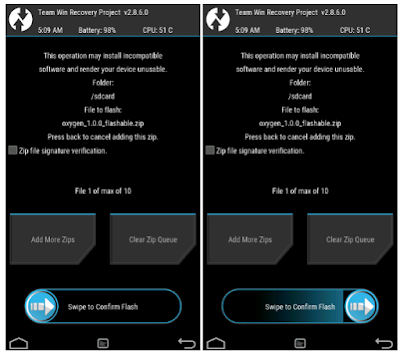
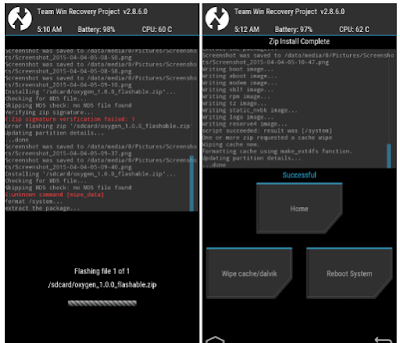
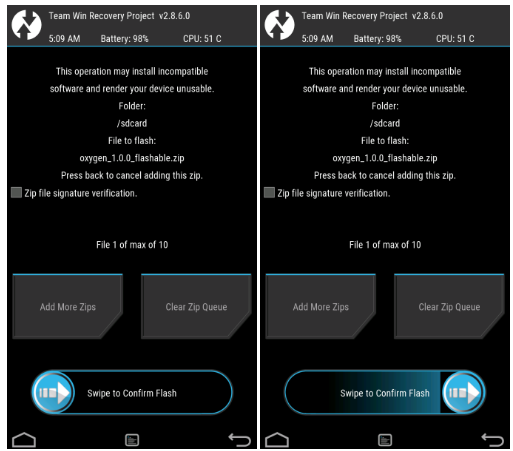
- You need to confirm installations swiping the Swipe to Confirm Flash button. The flashing process will start.
- After the installation is complete, then install the Gapps if you have, okey?

- Once finished, just tap Wipe cache/dalvik button only if you face the bootloop or errors.
- You need to tap the Reboot System button.

- Finish.